Skip to Content
  • Solutions

    Your challenge

    By challenge

    Start from the problem you have today.

    Solving document chaosFind every document by what it isRemoving manual workLet the system file and forwardEliminating audit stressEvery file audit-ready, every dayPreparing data for AIThe right version for AIAI across all your systemsOne governed knowledge layer

    Your sector

    By sector

    Blueprints for regulated sectors where documents carry liability.

    Read client cases →
    Accountancy & audit firmsPermanent files to e-signatureFinancial servicesKYC, contracts and client filesLegalMatters and deadlinesConstruction & engineeringDocument control and transmittalsManufacturingSpecs, quality and supplier filesPublic sectorRecords and compliance

    Your process

    By process

    One process, end to end.

    See the process library →
    Contract managementFrom first draft to renewalQuality management (QHSE)ISO, procedures and auditsPersonnel files (HR)Right access, right retention

    Free advice call

    Not sure where to start?

    Thirty minutes with a process architect. No obligation.

    Audit scoreHow audit-ready are you?Contract risk scoreHow big is your risk?

    Book a free advice call

  • Platforms
    M-Files

    One search bar for all your business information, with AI on your own documents.

    Why M-Files →
    M-Files AIAI on your own documentsCompare editionsWhich edition fits youM-Files HubshareSecure client portalM-Files MentNo-code document generationCompare M-FilesAgainst SharePoint, DocuWare, OpenText and more
    SharePoint +MacroView

    Mail and documents in SharePoint, managed as real case files.

    MacroView overview →
    SharePoint with SoftAdviceMicrosoft 365 as your document platformFiling from OutlookE-mail in the right file, in one moveAutomatic e-mail filingRules that file by themselvesAll MacroView featuresEvery feature on one pageMacroView or M-Files?An honest comparison
    Mindbreeze

    AI answers across all your systems, from trusted sources.

    Mindbreeze overview →
    Use casesSeven scenarios to start fromMindbreeze Insight WorkplaceAI agents and governed workflowsAgentic AIThe right context for every agentDeployment and securityCloud, hybrid or on premises
    dox42

    Automate every document, from any system.

    dox42 overview →
    dox42 with M-FilesGenerate straight into M-FilesPlan a dox42 demoSee it on your documentsAll integrationsERP, CRM, e-signing and more

    See it live.

    One hour, online, on your real use case.

    Plan an AI readiness talkFor AI across all your systemsMicrosoft 365M-Files and Microsoft, together

    Plan a demo

  • Approach

    How we work

    Process first. Technology second.

    Five steps from analysis to a working system, with one team end to end.

    See our approach →
    1. DiscoveryHalf-day session, advice within 10 days2. Discovery & designMap your processes and information3. Implementation & configurationBuild and configure your platform4. Integrations & customisationConnect and tailor to your systems5. Success servicesAdoption, support and growth

    AI governance

    AI you can defend

    Policies, controls and oversight for AI on your data.

    Governance framework →
    Shadow AI under controlWhat it is and how to contain itIs your data ready for Copilot?Check it before you switch it on

    Price request

    What does it cost?

    Transparent pricing per platform and per service.

    Price calculatorEstimate your licence costROI calculatorCalculate your savings

    Request a price

  • Knowledge

    Learn

    Knowledge Hub

    Learning, proof and what changes.

    Open the Knowledge Hub →
    BlogLong reads on information architectureWebinarsLearn it in an hourAnalyst reportsGartner and Forrester, no paywallUpdatesProduct news, translated into impact

    Regulation

    What the rules mean

    What each rule means for your documents.

    Regulation overview →
    PeppolMandatory in Belgium since 2026NIS2Cybersecurity duties for the mid-marketeIDAS 2The EU digital identity walletEU AI ActWhich obligations apply whenRetention periodsBelgium, the Netherlands and Luxembourg

    Free tools

    Answers in minutes

    Quick checks you can run today.

    SharePoint or M-Files?Take the 8-question quizRetention period lookupHow long to keep what

    AI Readiness Scan

    Is your data ready for AI?

    7 questions, your score out of 100 and concrete next steps.

    NewsletterOnce a month, in your language

    Start the scan

  • Cases
  • Who we are
  • Client zone
SoftAdvice - Proces & information architects
  • Plan a demo
  • Nederlands Nederlands (BE) English (US) Français (BE)
SoftAdvice - Proces & information architects
      • Solutions
      • Platforms
      • Approach
      • Knowledge
      • Cases
      • Who we are
      • Client zone
    • Nederlands Nederlands (BE) English (US) Français (BE)
    • Plan a demo

    Home/Integrations/SoftAdvice apps/Mail Importer

    SoftAdvice app

    Mail Importer: from Outlook mailbox to M-Files workflow

    Mail Importer pulls incoming mail and its metadata from Outlook mailboxes into M-Files, based on rules you define. Each mail is linked to the right object, or to a new one, and the follow-up workflow starts by itself.

    See how it works Discuss your mailboxes

    Built by SoftAdviceMicrosoft Outlook via EntraAny sector
    info@ mailbox
    Question about an invoiceInformation request createdFinance
    Reply from a clientLinked to the client dossierFiled
    Application for a vacancyCandidate createdHR
    Unknown senderFollow-up item createdCheck

    Illustrative example

    In shortHow it worksUse casesAdvantagesPracticalFAQ

    In short

    Mail Importer is an M-Files app built by SoftAdvice that pulls incoming mail from Microsoft Outlook mailboxes into M-Files automatically, through an app registered in Microsoft Entra. A set of rules decides what happens with each mail: it is saved with its metadata, such as subject, sender, recipients and date, and linked to the right object or to a newly created one, after which a follow-up workflow can start. E-mails become structured, searchable and actionable alongside the rest of the dossier.

    How it works

    Every mail in the right place, without dragging and dropping

    1 / 3Intake

    Outlook mailboxes read automatically

    Mail Importer connects to one or more Outlook mailboxes through an app registered in Microsoft Entra and reads them on a schedule. Rules you define per mailbox decide what happens with each mail.

    • Shared mailboxes such as info@ or jobs@
    • Secure access through Microsoft Entra
    • Subject, sender, recipients and date as metadata
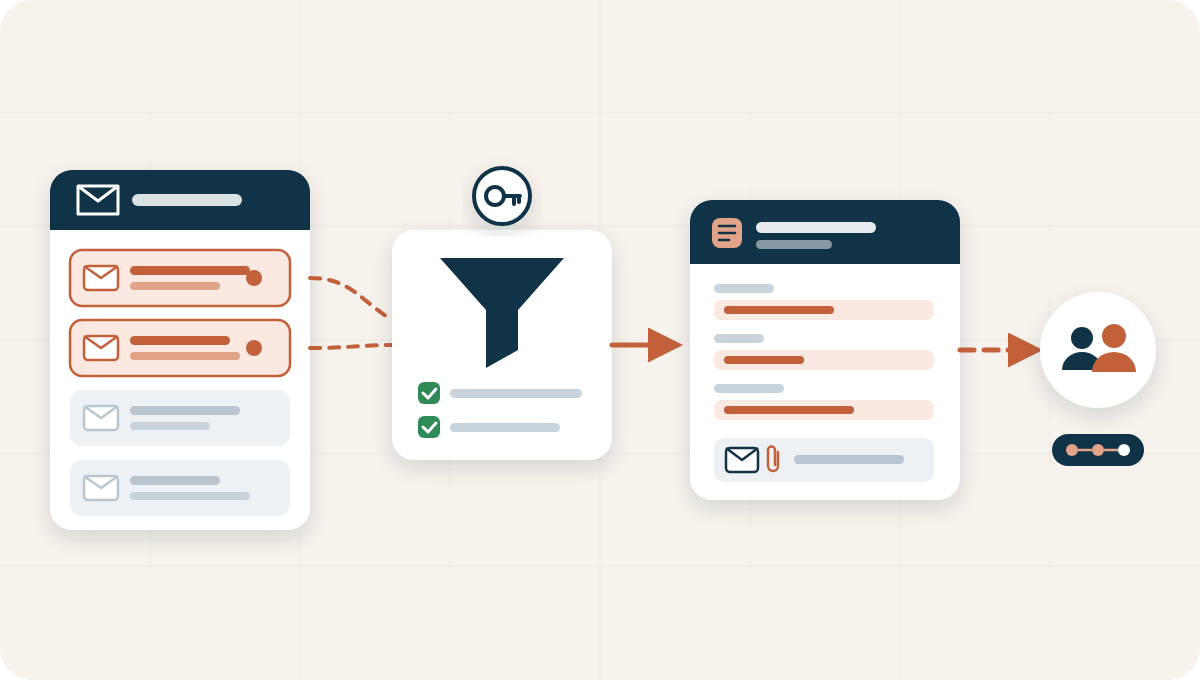
    Mails from an Outlook mailbox pass through rules, are attached to an M-Files object and start a workflow for a department
    2 / 3Link

    Linked to the right object, or to a new one

    Each mail is hooked up to the object it belongs to, such as a client, a project or a case. When no object exists yet, the rules can create one, for example an information request or a candidate.

    Information request
    Question about delivery
    Sender
    From the mail
    Received on
    From the mail
    Attached mail
    Original message
    Assigned to
    Customer service
    Illustrative example

    Illustrative example

    3 / 3Follow-up

    The workflow takes over, nothing gets lost

    Once the mail is in M-Files, a workflow can push it to the right department. Processed mail moves to a folder of its own; mail the rules cannot handle goes to a separate folder, comes back as a follow-up item and triggers a notification.

    After the import
    Workflow startedAssigned to the departmentDone
    MailboxMail moved to the processed folderDone
    ExceptionFollow-up item and notificationCheck

    Illustrative example

    Use cases

    From mailbox to dossier, in every department

    Examples of rules that turn mail into work in M-Files.

    Information requests

    A general mailbox is read out: each question becomes an information request in M-Files with the mail attached, and the workflow pushes it to the right department.

    Read more

    Candidates for open positions

    The HR mailbox is read out: for every application a candidate object is created for the open position and pushed into the recruitment workflow.

    Read more

    Mail on the dossier

    Mail from clients, suppliers or partners is linked to their existing dossier, next to the documents, so everyone sees the full history.

    Advantages

    Why let the mailbox feed M-Files

    Mail stops being a separate island and becomes part of the dossier and the process.

    1

    No manual filing

    Mails reach M-Files without anyone dragging them there.

    2

    Structured and searchable

    Subject, sender, recipients and date become metadata you can search on.

    Read more

    3

    Work starts immediately

    A workflow assigns the mail to the right department or person.

    4

    Nothing gets lost

    Mail that does not fit the rules comes back as a follow-up item with a notification.

    5

    The full dossier in one place

    Mails sit next to the documents of the same client, project or case.

    6

    Secure connection

    Access to the mailboxes goes through an app registered in Microsoft Entra.

    Practical

    At a glance

    Mail Importer is built and supported by SoftAdvice. We set up the connection to your mailboxes, the rules per mailbox and the follow-up workflows together with you.

    Datasheet

    Systems
    M-Files and Microsoft Outlook
    Direction
    Inbound: Outlook to M-Files
    Connection
    App registered in Microsoft Entra
    Runs
    On a schedule
    Result
    Mail linked to an existing or new object
    Availability
    International, any sector

    Questions about Mail Importer

    What does Mail Importer do?

    It pulls incoming mail and its metadata from Outlook mailboxes into M-Files, links each mail to the right object or a new one, and can start a follow-up workflow.

    How does it connect to our mailboxes?

    Through an app registered in Microsoft Entra, which gives secure access to the mailboxes you choose.

    Can it create new objects?

    Yes. When a mail does not belong to an existing object, the rules can create one, for example an information request or a candidate for an open position.

    What happens with mail the rules cannot handle?

    It goes to a separate folder, comes back as a follow-up item in M-Files and triggers a notification, so nothing is lost.

    Is it for a specific sector?

    No. Mail Importer works in any sector and in any department that receives mail in a shared mailbox, from customer service to HR.

    Related

    All SoftAdvice appsDocument GeneratorM-Files for HRWhat is a workflow?

    Which mailbox should run by itself?

    Tell us which mailbox and which follow-up, and we show you how the rules handle it.

    Discuss your mailboxes

    See how it works

    SoftAdvice

    Process & information architects

    Partner of M-Files since 2010, and of MacroView and Mindbreeze, in Belgium, the Netherlands and Luxembourg.

    Otterstraat 199
    2300 Turnhout, Belgium
    info@softadvice.eu
    Belgium +32 2 895 06 00
    Netherlands +31 79 799 61 40
    Luxembourg +352 27 86 46 55

    LinkedIn

    Platforms

    • M-Files
    • SharePoint + MacroView
    • Mindbreeze

    Integrations

    • dox42
    • Penneo
    • Microsoft 365
    • All integrations

    Services

    • Discovery
    • Process consulting
    • Implementation
    • Integrations
    • Success services
    • AI governance

    Company

    • Who we are
    • Knowledge Hub
    • Newsletter
    • Contact

    Partners

    M-Files Solution PartnerSolution PartnerMacroViewMindbreezedox42

    Newsletter

    Once a month, in your language. Unsubscribe at any time.

    Subscribe

    Thank you. You will receive the next edition in your mailbox.

    © 2026 SoftAdvice BV. All rights reserved.

    PrivacyCookiesTerms

    We use cookies to provide you a better user experience on this website. Cookie Policy

    Only essentials I agree