Home/SharePoint/MacroView
MacroView on SharePointAn inbox is not a file. MacroView fixes that.
Half of every file lives in someone’s mailbox. MacroView puts e-mails and documents in the right SharePoint file, straight from Outlook, Office and Teams. By hand in one move, or automatically by rule.
Book an introductory call See the products
Illustrative example
Trusted by more than 100 organisations in the BeNeLux




















In short
E-mail and documents where they belong
- Outlook and Teams
- Automatic rules
- Your own Microsoft 365
MacroView is software for e-mail and document management on SharePoint. It brings SharePoint, Teams and OneDrive into Outlook, Office and Teams, so people file e-mails and documents in the right file without opening a browser. Rules can file e-mail automatically, also from shared mailboxes. Everything stays in your own Microsoft 365 environment, with your existing permissions. SoftAdvice delivers the full MacroView range and sets up the SharePoint structure behind it.
Where e-mail and documents get lost today
Hover over or tap a card to see what MacroView changes.
Saving to SharePoint takes too many clicks
So people keep e-mail in Outlook and files on their desktop.
Drag and drop from Outlook
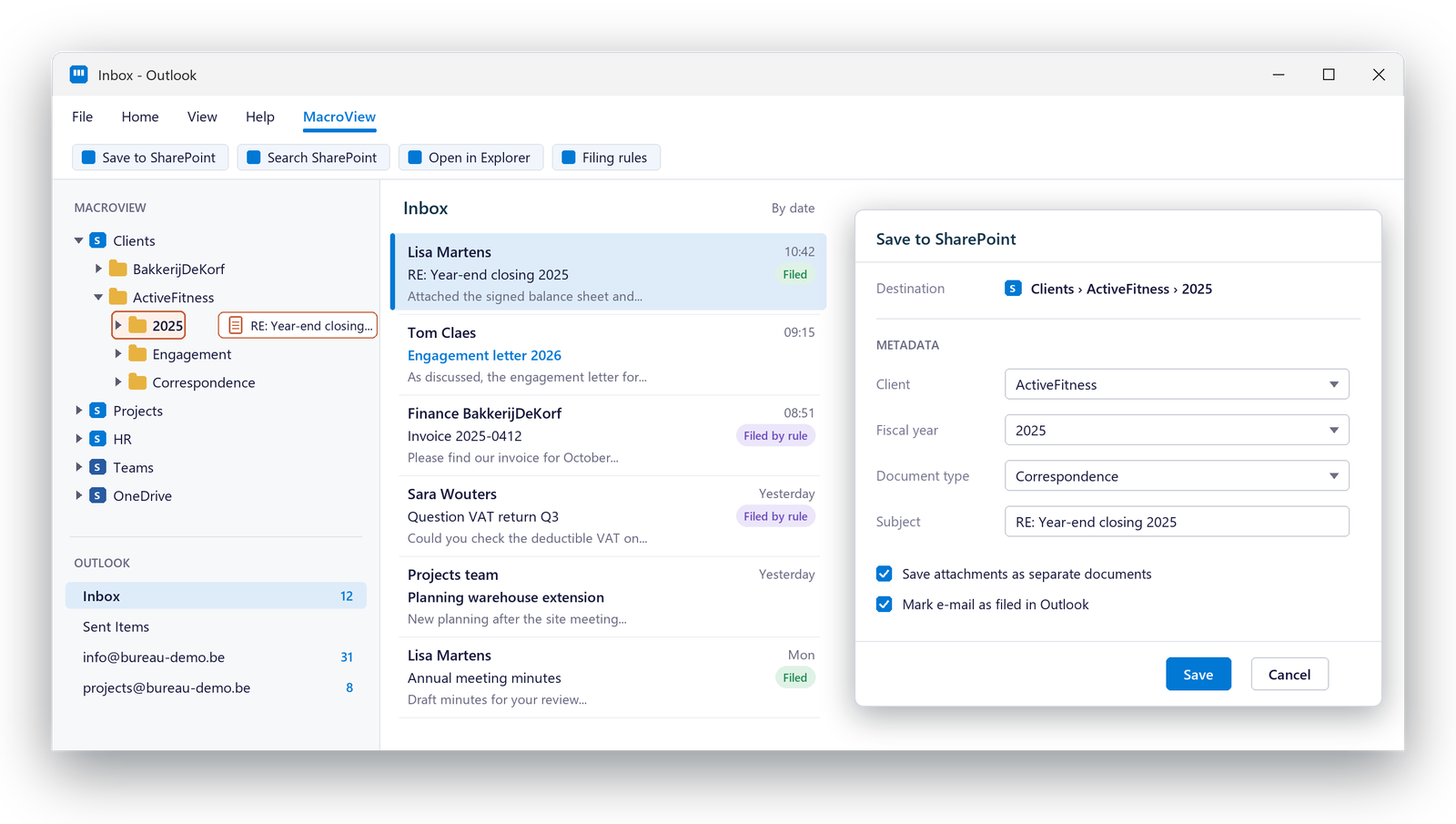
A familiar tree view of SharePoint, Teams and OneDrive inside Outlook. Drag the e-mail to the right file, done.
Shared mailboxes overflow
Nobody feels responsible for filing info@ or the project mailbox.
Rules that file by themselves
MacroView SureFile files e-mail by central rules, also from group and shared mailboxes.
Every file looks different
Each new client or project gets a folder structure of its own.
Structure at the right-click
New client or new project? One right-click and the full structure is ready, the same every time.
Years of e-mail in PST files and file shares
The history you need is everywhere except in SharePoint.
A clean migration
MacroView Migrator moves e-mail, Public Folders and file shares to SharePoint, captures metadata and removes duplicates.
Filing that people actually do
SharePoint only works when everything ends up in it. MacroView makes that the easy way.
Quick
E-mail and attachments in the right file in one move, with the metadata captured on the way.
Automatic
Central rules file e-mail by themselves, to as many locations as needed.
Familiar
A Windows-style tree view, right-click menus and the Office ribbon. Nothing new to learn.
On every device
Save e-mail to SharePoint from Windows, macOS, iOS, Android and the web.
Yours
Everything stays in your own Microsoft 365 environment, with your existing permissions.
Four ways MacroView puts SharePoint to work
File and find without leaving Outlook
MacroView shows SharePoint, Teams and OneDrive as a tree inside Outlook and Teams. Drag e-mails and documents in, filter and search on metadata, open earlier versions and restore them.
- New and Classic Outlook, and Teams
- Search and filter on metadata
- Version history and restore
E-mail that files itself
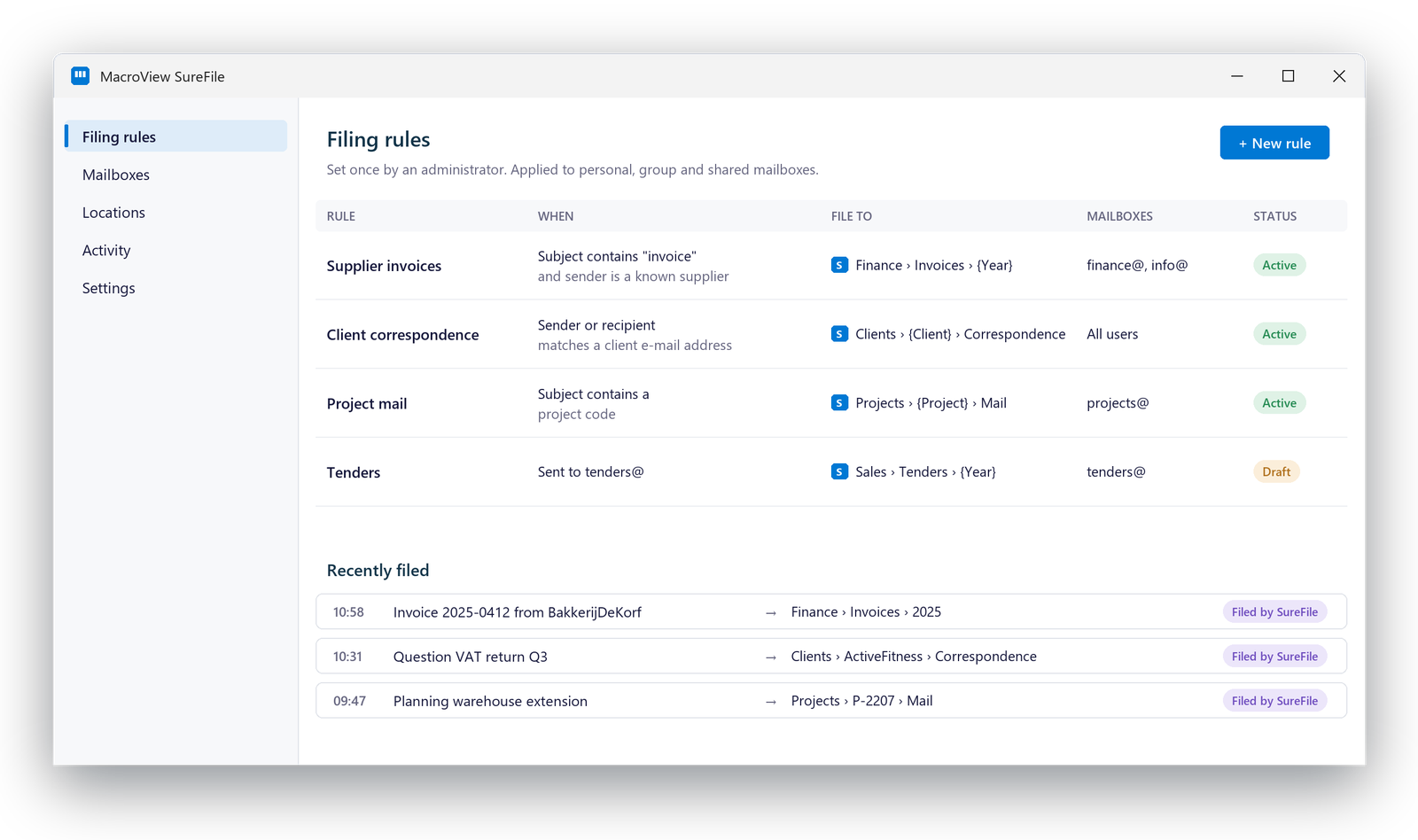
An administrator sets the rules once. SureFile files matching e-mails to the right locations and tags them in Outlook, so everyone sees what is filed. The Enterprise edition runs as a service in your own Azure, even when Outlook is closed.
- Central rules, set by an administrator
- Group and shared mailboxes included
- Filed e-mails tagged in Outlook
The same structure for every file
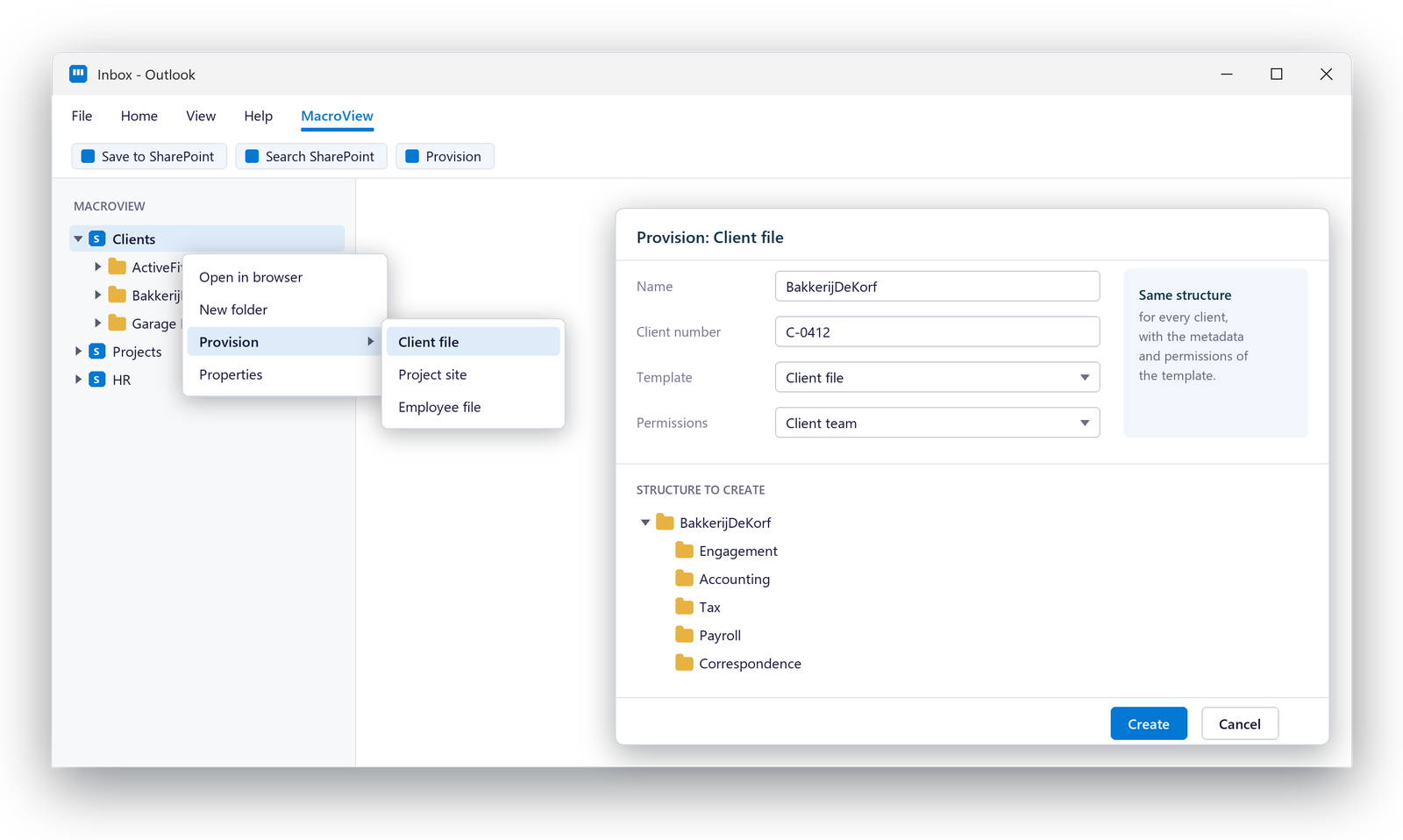
Create sites, libraries and folder structures from a template, one at a time with a right-click or in bulk. Every client and every project starts the same way, so everyone knows where things go.
- Right-click provisioning in MacroView DMS
- Bulk provisioning for many files at once
- Sites, libraries and folders from a template
Bring the history along
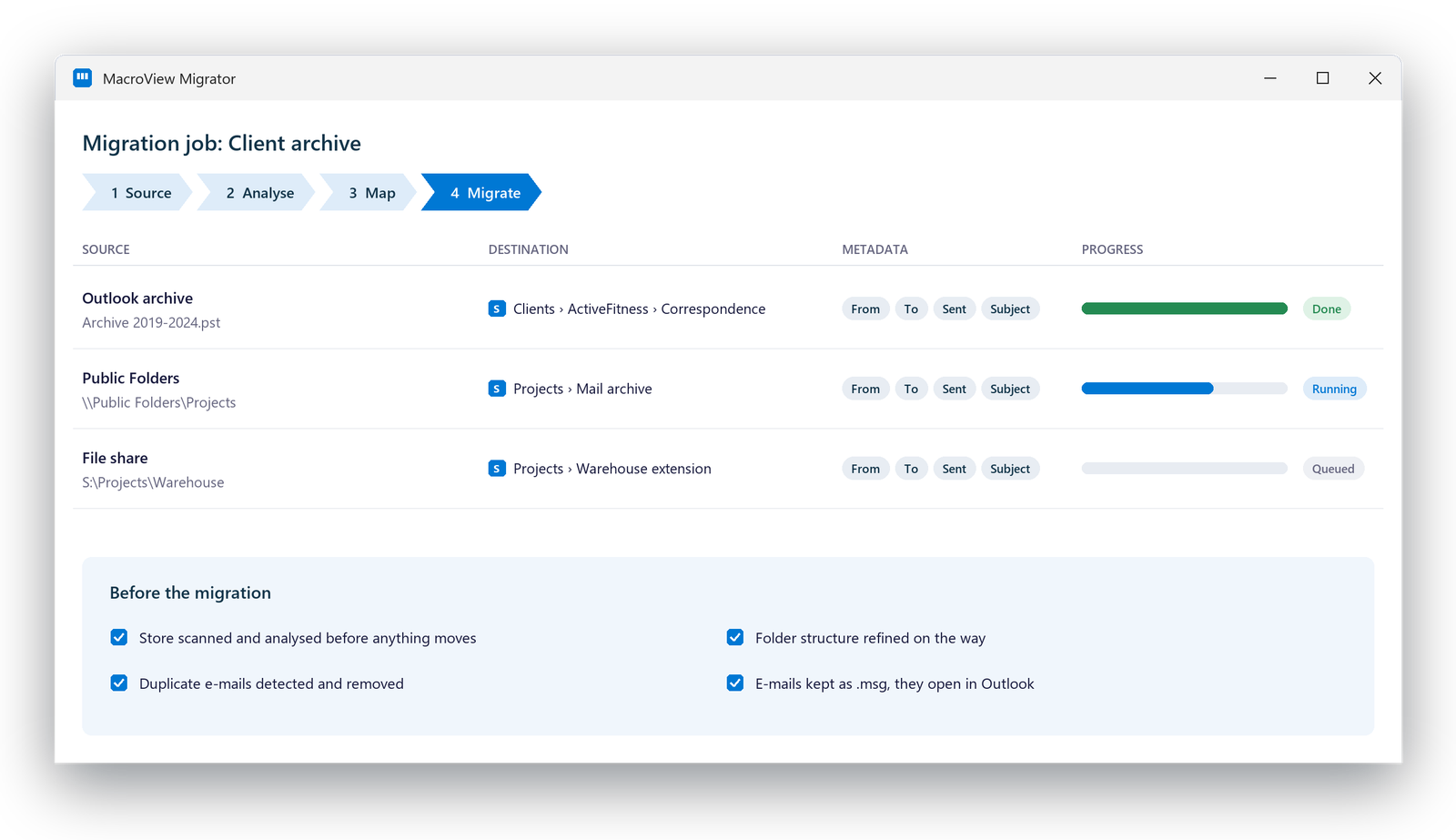
Move e-mail from Outlook, Public Folders and file shares into SharePoint, Teams or OneDrive. Migrator captures metadata on the way and removes duplicates, so you start clean.
- From Outlook, Public Folders and file shares
- Metadata captured during migration
- Duplicates removed
What MacroView does for your organisation
Every topic has its own page, with screenshots and the details.
Filing from Outlook and Office
E-mail and documents into SharePoint in one move, with metadata, from Outlook, Teams, Office and any device.
Read moreAutomatic e-mail filing
Central rules that file e-mail by themselves, also from group and shared mailboxes.
Read moreRecords and compliance
Declare records, add holds and read the audit history, straight from Outlook.
Read moreStructure and migration
The same structure for every file, and the history moved in from PST files, Public Folders and file shares.
Read moreCopilot is only as good as your filing
Copilot and other AI tools in Microsoft 365 work with what is in SharePoint, within the permissions you set. E-mail that stays in personal mailboxes stays outside the shared knowledge. Files without metadata are hard to find, for people and for AI.
With MacroView, e-mail and documents land in the right file with the right metadata and the right permissions. That is the foundation AI needs to give answers you can trust.
- E-mail in the file, not in a personal mailbox
- Metadata that makes content findable
- Permissions that decide who sees what
The full MacroView range
We deliver and support every MacroView product, and help you choose the combination that fits.
MacroView DMS Next
Simple document management and search in New and Classic Outlook and Teams, on Windows, iOS, Android and the web.
MacroView DMS
SharePoint and OneDrive in Classic Outlook, with a Windows-style tree view, right-click menus and e-mail filing rules.
MacroView DMS Pro
Everything in DMS, plus integration in the Microsoft 365 desktop apps and Adobe, and a built-in desktop explorer.
MacroView Mail
Save e-mail and attachments to SharePoint, Teams and OneDrive from any device, with metadata and consistent naming.
MacroView SureFile
Automatic e-mail filing by central rules, also from group and shared mailboxes.
MacroView Provisioner
Sites, libraries and folder structures from a template, by right-click or in bulk.
MacroView Migrator
From Outlook, Public Folders and file shares to SharePoint, Teams or OneDrive, with metadata and without duplicates.
MacroView Generator
New documents assembled from approved content in SharePoint, in your house style.
Made for organisations that live in e-mail
Accountancy
Client files per fiscal year, correspondence filed with the client, the same structure for every file.
Law firms
Files per client and matter, e-mail from Outlook in the right file.
Engineering and construction
Project files with the same structure, plans and correspondence together.
Insurance and financial services
Every policy and every client file complete, including the e-mail.
Property
One file per building or project, shared mailboxes filed automatically.
Public sector
Files and correspondence in one place, within the permissions you set.
When M-Files fits better
SharePoint with MacroView is strong at collaborating and filing. Do you have workflows with approvals, strict audits or documents that belong in several files at once? Then M-Files often fits better. We work with both and tell you honestly.
Read more about M-FilesFrequently asked questions about MacroView
What is MacroView?
MacroView is software for e-mail and document management on SharePoint. It brings SharePoint, Teams and OneDrive into Outlook, Office and Teams, and can file e-mail automatically by rule.
Where are our documents stored?
In your own Microsoft 365 environment, with your existing permissions.
Which MacroView products does SoftAdvice deliver?
The full range, including DMS Next, DMS, DMS Pro, Mail, SureFile, Provisioner, Migrator and Generator. We help you choose the combination that fits your organisation.
Does MacroView work in the new Outlook?
Yes. MacroView DMS Next works in New and Classic Outlook and in Teams. MacroView DMS and DMS Pro work in Classic Outlook.
Can e-mail be filed automatically?
Yes. MacroView SureFile files e-mail by central rules set by an administrator, also from group and shared mailboxes. The Enterprise edition runs as a service in your own Azure.
Do we need SharePoint for MacroView?
Yes. MacroView works on top of SharePoint, Teams and OneDrive in Microsoft 365. We set up the SharePoint structure as part of the project.
Want to see MacroView in your Outlook?
Book an introductory call. We look at how you file e-mail and documents today and which MacroView products fit.