Skip to Content
  • NL NL EN FR
  • Your challenge

    Your challenge

    Start from the problem you have today.

    Four situations we solve every week, for firms where documents carry liability.

    Book a call

    Situations

    • Solving document chaos"I know it exists. I just cannot find it."
    • Removing manual work"My team costs €60 an hour to forward emails."
    • Eliminating audit stress"The auditor is at the door. I cannot find anything."
    • Preparing data for AI"Copilot invented a contract that does not exist."

    Free tools

    • AI Readiness ScanFree, in 10 minutes
    • Audit scoreHow audit-ready are you?
    • ROI calculatorCalculate your savings

    Process & information architects

    Where do you start?

    Every engagement starts with a scan of your processes and documents.

    Plan a document scan

    AI Readiness ScanROI calculator

    100+ implementations across the BeNeLux since 2010.

  • Sectors

    Who we work for

    Built for document-heavy, regulated teams.

    Across the BeNeLux, from accountancy to engineering to scale-ups.

    Read a customer story

    Who you are

    • Accountants & audit firmsCompliance, audits and client files
    • Engineers & project organisationsProject documents under control
    • HR departmentsEvery personnel file complete and GDPR proof
    • Scale-ups & mid-marketGrow without document chaos

    Pick your sector

    Accountants and engineers have dedicated solutions. Point at your sector to see them.

    Doxxi for accountants

    • MyMinFin automationDownloaded and filed automatically
    • KYC and onboardingWithout AML stress
    • Deadline dashboardVAT, annual accounts, UBO in one view
    • Digital signatures via PenneoSigned with itsme or eID
    • Client portalUpload and consult 24/7
    • AML compliance and audit trailProof for every check

    For engineers

    • Document controlRevisions and approvals, always the right version
    • TransmittalsDocument distribution with a full log
    • Deliverables managementVendor deliverables and placeholders, without Excel
    • As-built filesA living file linked to assets and tags

    Process & information architects

    Not sure which fits?

    Tell us your sector and we show you the closest fit.

    Book a call

    Read a caseAudit score

    100+ implementations across the BeNeLux.

  • Platforms

    Platforms

    The right platform is a design decision.

    We design the structure first, then choose the platform that fits how you work.

    Why M-Files

    M-Files

    • 10 reasons to choose M-FilesThe short business case
    • Compare editionsWhich edition fits you
    • Pricing and calculatorEstimate your licence cost
    • M-Files AIAI on your own documents
    • M-Files HubshareSecure client portal
    • M-Files MentNo-code document generation
    • Compare M-FilesAgainst SharePoint, DocuWare, OpenText and more

    dox42

    • dox42 overviewDynamics, SAP and more
    • dox42 with M-FilesGenerate straight into M-Files
    • Plan a dox42 demoSee it on your documents

    Integrations

    • Microsoft 365, Teams and OutlookWork inside Office
    • All integrationsE-signatures, ERP, CRM and more

    MacroView

    • MacroView overviewE-mail and documents in SharePoint
    • Filing from OutlookE-mail in the right file, in one move
    • Automatic e-mail filingRules that file by themselves
    • All MacroView featuresEvery feature on one page
    • MacroView or M-Files?An honest comparison

    M-Files Solution Partner

    See it live.

    One hour, online, on your real use case. Your process, not slideware.

    Plan a demo

    Price calculatorAI Readiness Scan

    100+ implementations across the BeNeLux since 2010.

  • Services

    Our services

    Process first. Technology second.

    From discovery to a live system, one partner across the BeNeLux.

    See all services

    Delivery

    • Document scanYour information mapped in two weeks
    • Discovery & designMap your processes and information
    • Implementation & configurationBuild and configure your platform
    • Integrations & customisationConnect and tailor to your systems
    • Success servicesAdoption, support and growth

    AI governance

    • AI Readiness ScanFree, in 10 minutes
    • EU AI Act readinessBe ready for 2027
    • Governance frameworkPolicies, controls and oversight

    Process & information architects

    Where do you start?

    Every engagement starts with a scan of your processes and documents.

    Plan a document scan

    AI Readiness ScanROI calculator

    100+ implementations across the BeNeLux since 2010.

  • Who we are
  • Knowledge centre

    Knowledge centre

    Start here.

    Short, practical explanations from our consultants. No vendor spin.

    Open the Knowledge Hub

    Learn

    • BlogLong reads on information architecture
    • WebinarsLearn it in an hour
    • Knowledge hubEvery concept, explained

    Proof

    • Cases100+ implementations, names and numbers
    • Analyst reportsGartner and Forrester, no paywall

    Stay current

    • UpdatesProduct news, translated into impact
    • All postsEverything in one stream

    Latest

    EU AI Act: what changes in December 2027

    Why information architecture decides whether you are ready.

    Read the article

  • Client zone
SoftAdvice - Proces & informationarchitects
  • Plan a demo
SoftAdvice - Proces & informationarchitects
      • Your challenge
      • Sectors
      • Platforms
      • Services
      • Who we are
      • Knowledge centre
      • Client zone
    • NL NL EN FR
    • Plan a demo

    Home/SharePoint/MacroView/Structure and migration

    MacroView · Structure and migration

    The same structure for every file, with the history on board

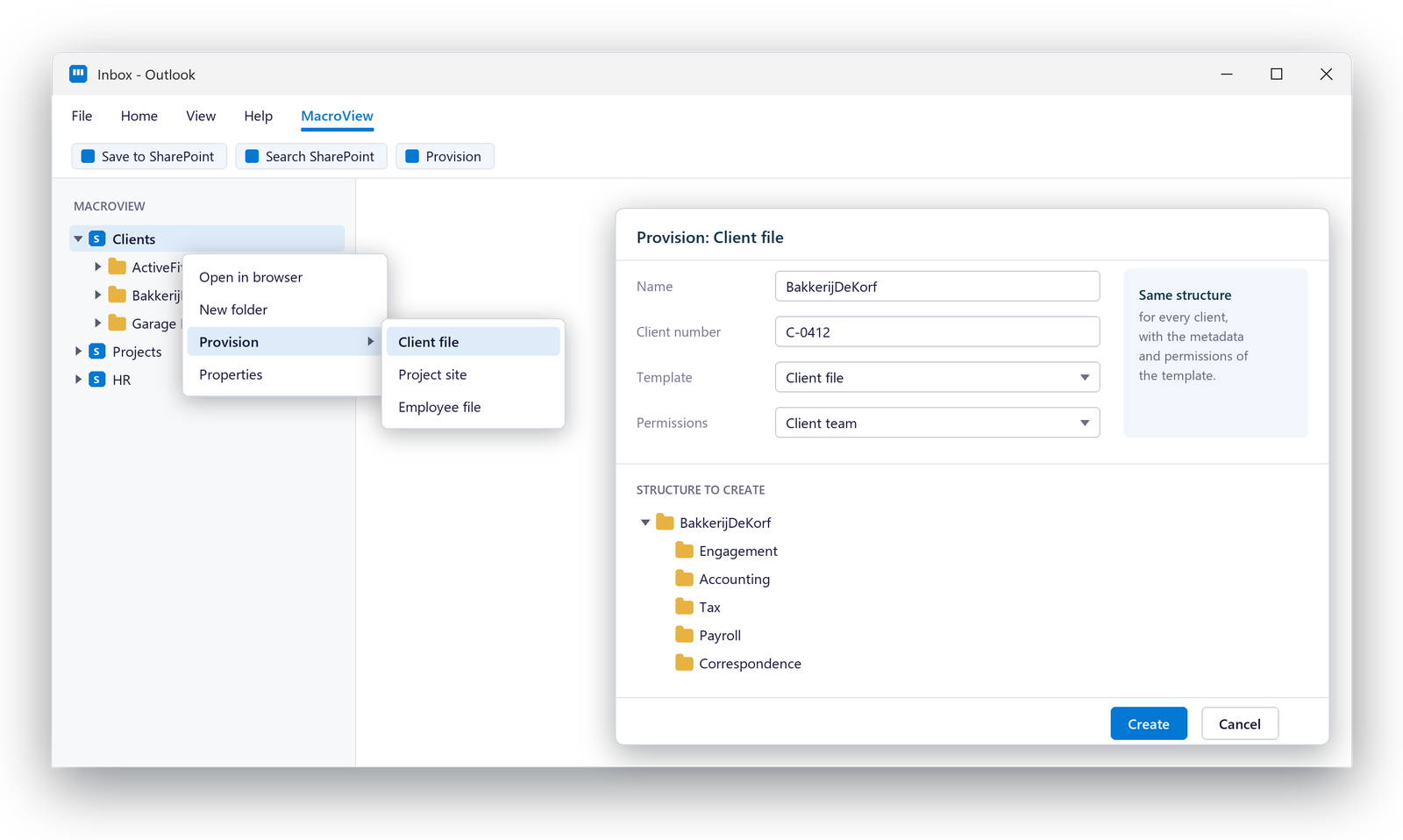
    New client or new project? One right-click and the full structure is ready, with its metadata and permissions. And the e-mail history in PST files, Public Folders and file shares moves along.

    Book an introductory call How it works
    Microsoft PartnerIn your own Microsoft 365Dutch, French, English
    Right-click provisioning in MacroView: a new client file created from the Client file template, with its folder structure and permissions shown before it is created
    In shortSound familiar?How it worksWhat is includedQuestions

    In short

    MacroView Provisioner creates SharePoint sites, libraries and folder structures from templates, in bulk or one at a time with a right-click in MacroView DMS. MacroView Migrator moves e-mail from Outlook, Public Folders and file shares into SharePoint, Teams or OneDrive, captures metadata and removes duplicates. MacroView Standardiser adds e-mail metadata and an Outlook-like view to e-mails already in SharePoint.

    Sound familiar?

    Why SharePoint grows wild

    Hover over or tap a card to see what MacroView changes.

    Every file looks different

    ↻
    With MacroView

    One template per type of file

    Sites, libraries and folders created from the same template, with the same metadata and permissions.

    A new site means a ticket for IT

    ↻
    With MacroView

    A right-click for the right people

    Right-click provisioning in MacroView DMS, with permission-based access to who may create what.

    History in PST files and Public Folders

    ↻
    With MacroView

    Migrated with metadata

    MacroView Migrator moves e-mail and attachments into SharePoint, Teams or OneDrive, and captures the e-mail metadata.

    The same e-mail, five times

    ↻
    With MacroView

    Duplicates removed

    Duplicates are removed during the migration, so each e-mail lands once and storage stays lean.

    How it works

    From old storage to a clean structure

    Analyse the current store

    Scan PST files, Public Folders and file shares before anything moves.

    Design the structure

    Templates per type of file, with metadata and permissions, matched to how you work.

    Migrate with metadata

    E-mails and attachments move into the new structure, duplicates removed, kept as .msg.

    Grow with a right-click

    Every new client or project gets the same structure from the template.

    What is included

    Two tools, one clean SharePoint

    1 / 2MacroView Provisioner

    Structure from a template, by right-click or in bulk

    Create sites, libraries and folder structures in bulk when you start, and one at a time with a right-click afterwards. Right-click provisioning is a free add-on to MacroView DMS.

    • Bulk provisioning of sites, libraries and folders
    • Right-click provisioning in Outlook and Microsoft 365
    • Permission-based: only the right people create
    New client file
    Clients › BakkerijDeKorf
    Template
    Client file
    Folders
    Engagement, Accounting, Tax, Correspondence
    Permissions
    Client team
    Ready with one right-click.

    Illustrative example

    2 / 2MacroView Migrator

    Bring the history along, clean

    Migrator moves e-mail from Outlook, Public Folders and file shares into SharePoint, Teams or OneDrive. E-mails already in SharePoint? MacroView Standardiser adds their metadata and an Outlook-like view, so they are easy to find.

    • Analysis of the Public Folder store before migrating
    • E-mail metadata captured automatically
    • Duplicates removed, e-mails kept as .msg
    • Afterwards: open, search and filter from Outlook
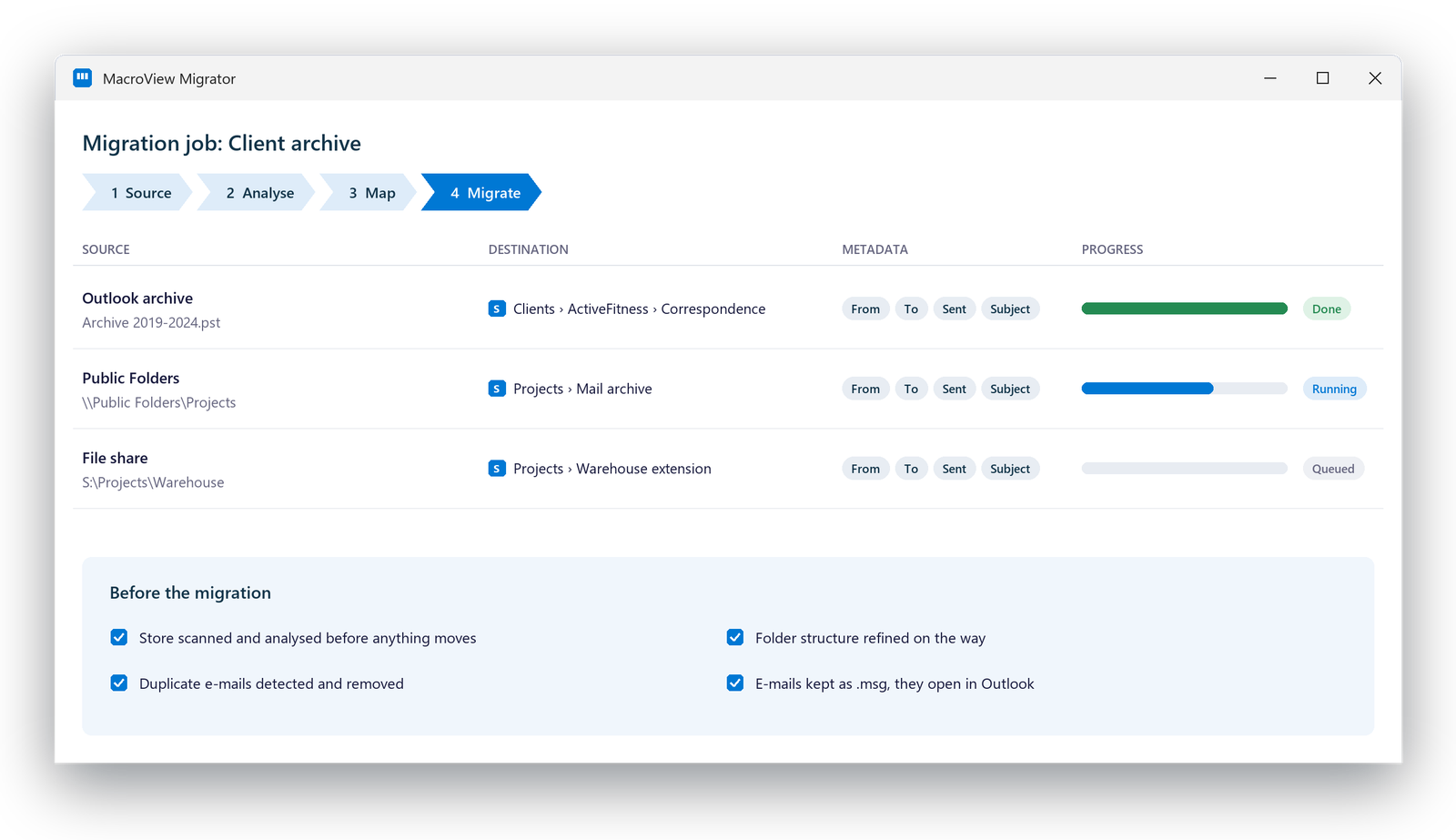
    A MacroView Migrator job: an Outlook archive, Public Folders and a file share moving to SharePoint with their e-mail metadata, and the checks done before the migration

    Questions about structure and migration

    Do we have to migrate everything at once?

    No. We analyse the current store first and migrate in parts, per mailbox, Public Folder or file share.

    Where can the content go?

    Into SharePoint, Teams or OneDrive, in your own Microsoft 365 environment.

    Who can create new sites with a right-click?

    Only the people you allow. Right-click provisioning is permission-based.

    What about e-mails already in SharePoint?

    MacroView Standardiser extracts their metadata, adds an Outlook-like view and removes duplicates, so they become searchable from Outlook.

    More MacroView topics

    Filing from Outlook and Office

    E-mail and documents into SharePoint in one move, with metadata, from Outlook, Teams, Office and any device.

    Read more

    Automatic e-mail filing

    Central rules that file e-mail by themselves, also from group and shared mailboxes.

    Read more

    Records and compliance

    Declare records, add holds and read the audit history, straight from Outlook.

    Read more

    All MacroView features

    Every feature on one page, filterable by theme.

    Read more

    Related

    Back to MacroViewSharePoint as full document managementAll MacroView features

    Ready for a clean SharePoint?

    Book an introductory call. We look at how you file e-mail and documents today and which MacroView products fit.

    Book an introductory call

    Book an introductory call

    SoftAdvice

    Process & information architects

    M-Files Solution Partner since 2010, active in Belgium, the Netherlands and Luxembourg.

    info@softadvice.eu
    Belgium +32 2 895 06 00
    Netherlands +31 79 799 61 40
    Luxembourg +352 27 86 46 55

    Plan a document scan

    Platforms

    • M-Files
    • dox42
    • Penneo
    • Microsoft 365
    • All integrations

    Services

    • Document scan
    • Process consulting
    • Implementation
    • Integrations
    • Success services

    Company

    • Who we are
    • Knowledge Hub
    • Jobs
    • Newsletter
    • Contact

    © 2026 SoftAdvice BV. All rights reserved.

    PrivacyCookiesTerms

    We use cookies to provide you a better user experience on this website. Cookie Policy

    Only essentials I agree